Button entry has to feel trustworthy
A physical button press only helps caregivers if the app reflects the event consistently, clearly, and without confusing layout shifts.
Mobile + Connected Device Case Study
Talli sits at the intersection of mobile product work, connected-device reliability, and caregiver trust. Taylor worked across the React Native interface, the Expo SDK 52 migration, native Android release readiness, and the hardware upgrade from ESP-12S to ESP32 for a physical button device that sends quick care events into the app.
The final v1.3.4 release story is practical and technical: make the hardware handshake observable, keep SDK 52 state consistent, and present button events, battery, signal, provisioning, and diagnostics in a calm Material 3-inspired Android experience.
Release
Version 1.3.4 on final release branch v1.3.4-release
Platform
React Native / Expo SDK 52 targeting Android 16 Beta and API Level 36
Hardware
ESP32 upgrade from ESP-12S for a physical quick-entry button device with Wi-Fi handshaking and firmware v1.0.8 diagnostics
Problem
A physical button press only helps caregivers if the app reflects the event consistently, clearly, and without confusing layout shifts.
The move from Expo SDK 48 to SDK 52 was the key architecture change behind sharper Android 16 layouts and high-density display confidence.
Bluetooth pairing, Wi-Fi handshakes, baud-rate timing, and router behavior needed to be made observable enough to debug and explain.
Actual App Screenshots
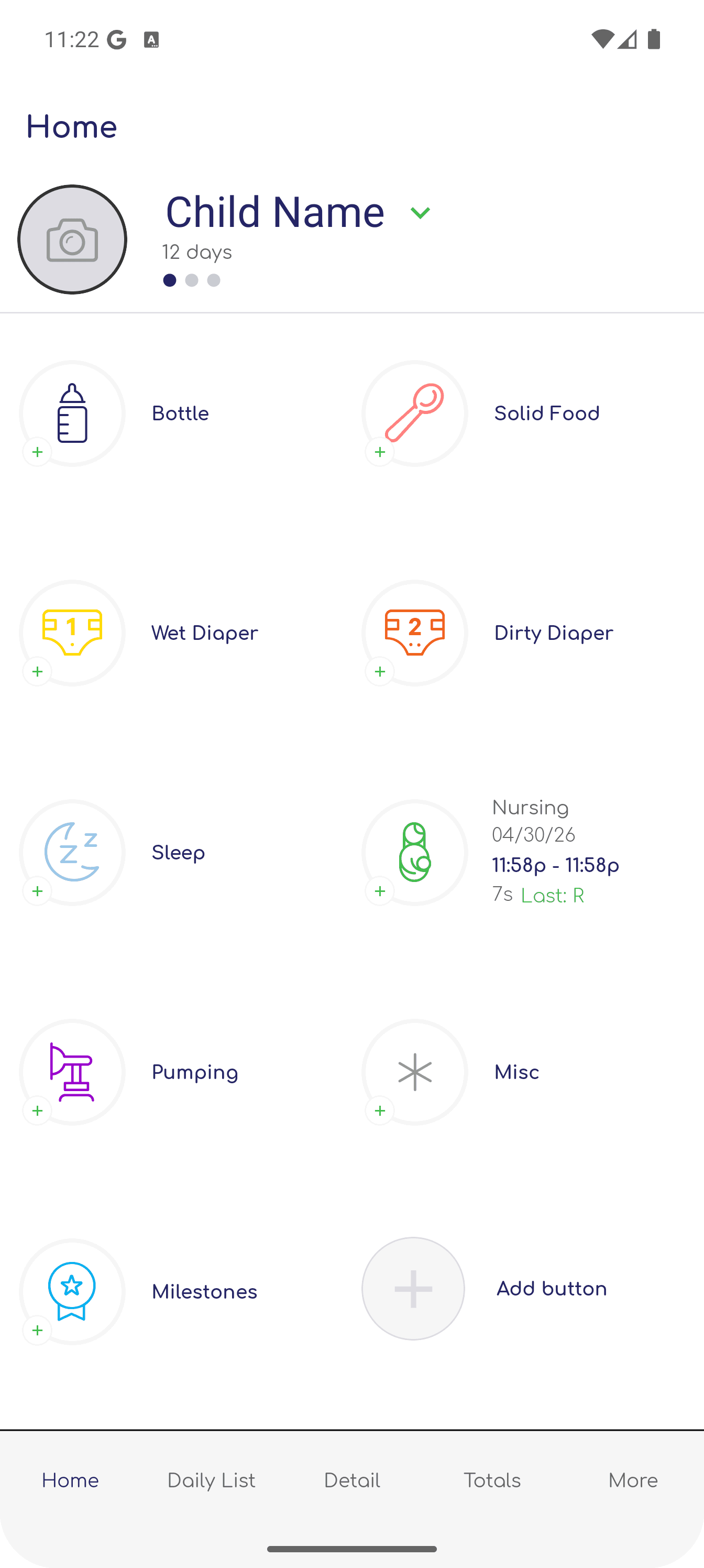
These full-screen captures keep the portfolio grounded in the real product: caregiver logging, device management, pairing instructions, custom buttons, and account workflows.
Screenshot 1 of 12
Care logging
The primary caregiver surface: child context, core event buttons, last-log details, and quick actions that map cleanly to the physical button device.
System View
The work crossed several boundaries: caregiver-facing screens, Expo and Android tooling, ESP-12S to ESP32 migration concerns, firmware behavior, physical button event propagation, Wi-Fi state, and the release path needed to get updates into the hands of testers.
Button device
Captures quick caregiver events from physical button presses on the Talli device.
ESP32 upgrade
Moves the hardware foundation from ESP-12S to ESP32 for a more capable connected-device implementation.
Wi-Fi handshake
Propagates low-latency button events into the mobile app once provisioning completes.
SDK 52 state
Normalizes hardware events and device state into data-driven React Native UI components.
Material 3 UI
Displays dashboard, provisioning, and diagnostics views with Android 16 visual stability.
Native release
Packages Android artifacts for testing, Play Console review, and release readiness.
Implementation
Release Path
Move the app onto Expo SDK 52 so the Android UI could rely on newer layout behavior and sharper high-density rendering.
Prepare native Android artifacts with API Level 36 compatibility, installability checks, and beta platform behavior in mind.
Treat APK/AAB deployment as the production path, with Vercel kept only for secondary web artifacts.
Debugging Loop
Outcomes
Stable release frame
Version 1.3.4 can be presented as a coherent mobile, Android, and connected-device milestone.
Event clarity
The case study shows how physical button events, hardware state, provisioning, and diagnostics become readable product surfaces.
Engineering range
The project shows Taylor moving comfortably between UI work, build tooling, deployment, and hardware-adjacent debugging.
Lessons
A missed or delayed button event is not just a technical defect when the user is relying on the device in a caregiving routine. The interface has to explain what the system knows.
The SDK 52 migration mattered because it solved concrete Android 16 layout and density problems, not because newer tooling is automatically better.
Firmware versions, build metadata, and target platforms are portfolio-relevant when they show how deeply the mobile app and hardware layer were integrated.
The screenshot gallery uses real app captures while keeping the story focused on the engineering surface: SDK migration, Android deployment, ESP-12S to ESP32 hardware work, physical button event consistency, and the responsibility of designing around caregivers.